

iPod Not Syncing/Restoring After Flash Mod? Here’s the Full Walkthrough for Apple Silicon Macs


Description
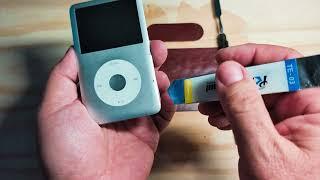
This is the dance that I have to go through every time I flash mod one of these iPods. I have a 2020 MacBook Pro M1 Running Ventura, so hope this helps. It will work eventually, just have to be persistent. Let me know if I can help at all in the comments.
Links to stuff:
iFlash Quad: https://amzn.to/46OldWt
Silicon Power SD Cards: https://amzn.to/4nOQkHt
Lock/Hold Switch Headphone Jack Thin: https://amzn.to/3L8Qyur
Lock/Hold Switch Headphone Jack Thick: https://amzn.to/3LrKvRI
Extended Battery Thin: https://amzn.to/3Wr39eX
Extended Battery Thick: https://amzn.to/47oVfI5
iPod 30 Pin Male to USBC Female Cable: https://amzn.to/3WzkaDE
Clear Case Thin: https://amzn.to/4nUCvHk
Kapton Tape: https://amzn.to/3L6Anh2
Opening Tools: https://amzn.to/43gb5TY
Stock Battery: https://amzn.to/4mVSvHN
Precisions Screwdrivers: https://amzn.to/4q6Ugoe
Soldering Iron: https://amzn.to/3KIJgNW
Timestamps:
00:00 Intro
00:45 First Plug In
01:40 Second Stage
02:33 Third Stage
03:18 Fourth Stage
04:00 "Restored" but Fifth Stage
05:00 Sixth Stage
05:40 Last Steps
06:40 Thanks for Watching Guys, Good Luck!
#iPodClassic #iPodMod #AppleSilicon #M1Mac #M2Mac #TechDIY #iPodFix #RetroTech #iPodRestoration #FlashMod #iPodSync #MacTips #ElectronicsRepair #VintageTech #techtroubleshooting
As an Amazon Associate, I earn from qualifying purchases. This means I may earn a small commission if you use the links in this description to make a purchase, at no additional cost to you.


















Comments